
Download Focuster – Goal‑Setting, Focus, and Productivity Software
Overview
Focuster is a purpose‑built productivity tool that helps professionals and students set realistic daily goals, schedule them intelligently, and stay on track without succumbing to endless distractions. By integrating a visual calendar, smart reminders, and an instant rescheduling engine, Focuster automatically prioritizes tasks that matter most, ensuring you allocate time for high‑impact work while avoiding the common trap of over‑booking your day. The application’s clean, clutter‑free interface makes it easy to focus on the task at hand, while its behind‑the‑scenes automation continuously updates your agenda as priorities shift.
Whether you bill hours for clients, manage a team, or simply want to get more done in less time, Focuster’s blend of goal‑setting, time‑blocking, and real‑time feedback gives you a structured yet flexible way to accomplish more each day. The tool also includes an Activity Bar that visualizes progress, letting you see at a glance which goals have been completed, which are in progress, and what remains to be tackled. By turning vague to‑do lists into concrete, time‑boxed commitments, Focuster empowers you to work smarter, reduce wasted minutes, and ultimately achieve a healthier work‑life balance.
Key Features
- Instant Calendar Rescheduling: Automatically moves tasks when higher‑priority items appear, keeping your schedule aligned with real‑time demands.
- Smart Reminders: Context‑aware notifications remind you of upcoming deadlines without overwhelming you with noise.
- Goal Visualization: A dynamic Activity Bar displays daily progress, helping you stay motivated and aware of remaining work.
- Clutter‑Free UI: Minimalist design reduces visual distractions, letting you focus on the tasks that truly matter.
- Time Blocking: Allocate specific time slots for each goal, ensuring realistic workload distribution.
- Cross‑Platform Sync: Seamlessly syncs across Windows, macOS, Android, and iOS devices so your schedule is always up‑to‑date.
- Customizable Prioritization Rules: Set your own criteria for what constitutes a high‑priority task, tailoring the engine to your workflow.
- Detailed Reporting: Export weekly or monthly productivity reports to analyze trends and improve future planning.
These features work together to eliminate the guesswork that often accompanies daily planning. By automatically adjusting your calendar when unexpected tasks arise, Focuster saves you the mental overhead of constantly re‑evaluating priorities. The smart reminders are designed to be subtle yet effective, nudging you just before a task’s window closes, which reduces the chance of procrastination.
Moreover, the Activity Bar gives you a visual representation of your day’s momentum, reinforcing positive habits and helping you identify bottlenecks. The combination of time blocking and customizable prioritization rules makes the software adaptable for freelancers, corporate teams, and students alike. With cross‑platform sync, you can switch between your laptop at the office and your phone on the go without missing a beat, ensuring continuity and confidence in your daily workflow.
Installation, Usage & Compatibility
Getting started with Focuster is straightforward. The application is available for download as a free trial on the official website, with optional paid plans for advanced features. Follow these steps to install and begin using the tool:
- Download the Installer: Visit Focuster’s download page and select the version appropriate for your operating system.
- Run the Installer: For Windows, run the
.exefile; for macOS, open the.dmgand drag the app to your Applications folder. Android users can download the APK from the Play Store, while iOS users install via the App Store. - Create an Account: Launch the app and sign up with your email or Google account. This creates a secure cloud profile that syncs across devices.
- Set Up Your First Day: The onboarding wizard asks you to input your top three priorities, estimated durations, and preferred working hours.
- Activate Smart Reminders: Enable push notifications to receive context‑aware alerts.
- Review & Adjust: At the end of each day, check the Activity Bar to see completed tasks and adjust any unfinished items for the next day.
Supported Platforms: Focuster runs on Windows 10 or later, macOS 10.14 (Mojave) and newer, Android 6.0+ and iOS 13+. The web version works in any modern browser (Chrome, Edge, Safari, Firefox) for quick access from public computers.
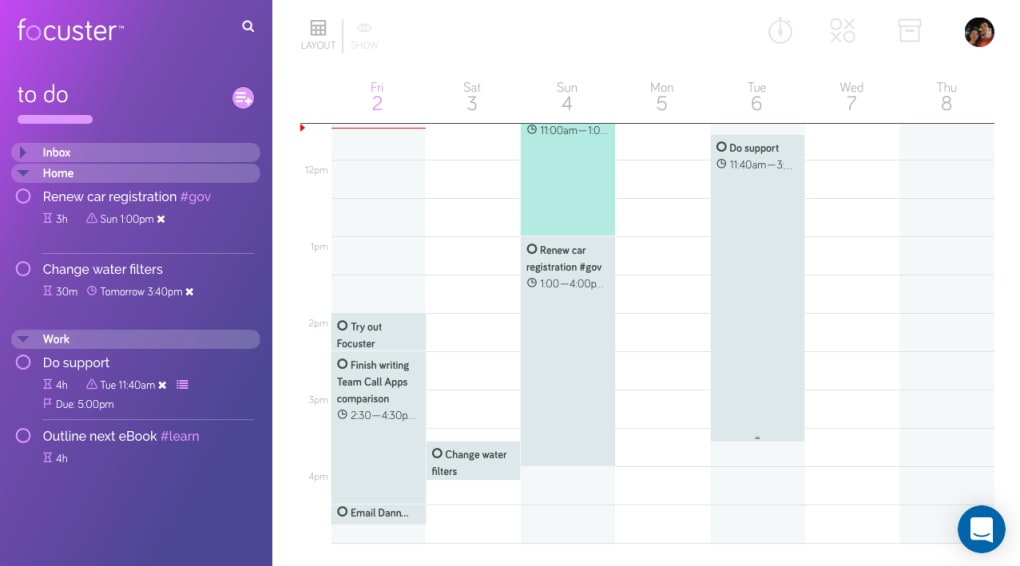
The usage experience is designed to be intuitive. After logging in, you’ll see a clean dashboard with a calendar view on the left and the Activity Bar on the right. Drag and drop tasks into time slots, set the priority level, and let the Instant Calendar Rescheduling engine do the heavy lifting. For power users, the Settings menu offers granular control over reminder intervals, priority algorithms, and integration with external calendars like Google Calendar or Outlook. Regular updates are delivered automatically, ensuring you always have the latest security patches and feature enhancements without manual intervention.
Pros and Cons
Pros
- Automatic rescheduling saves time and mental effort.
- Smart, non‑intrusive reminders keep you on track.
- Minimalist UI reduces distractions.
- Cross‑platform syncing ensures consistency.
- Customizable prioritization fits any workflow.
- Detailed reporting helps you improve productivity over time.
- Free trial available with clear upgrade path.
Cons
- Advanced features (e.g., custom reporting) require a paid subscription.
- Initial onboarding may feel overwhelming for users new to time‑blocking.
- Mobile app notifications can be delayed on older Android devices.
- No built‑in Pomodoro timer, which some productivity enthusiasts prefer.
The overall experience with Focuster is highly positive, especially for professionals who need a reliable system to manage billable hours and avoid over‑booking. While the premium tier unlocks deeper analytics, the free version already delivers substantial value.
Frequently Asked Questions
-
Is Focuster free to use?
Focuster offers a free 14‑day trial with access to core features. After the trial, you can continue with a free tier that includes basic scheduling and reminders, or upgrade to a paid plan for advanced reporting and premium integrations.
-
Can I sync Focuster with Google Calendar?
Yes. Focuster supports two‑way synchronization with Google Calendar, Outlook, and Apple Calendar, ensuring that any changes made in either app are reflected across all devices.
-
How does the Instant Calendar Rescheduling work?
When a higher‑priority task is added or an existing task runs over its allotted time, the engine automatically shifts lower‑priority items to the next available slot, preserving your overall workload balance without manual adjustments.
-
Is my data secure on Focuster?
Focuster uses AES‑256 encryption for data at rest and TLS 1.3 for data in transit. Your account information is stored on secure cloud servers with regular security audits.
-
Can I export my task history?
Yes. Paid plans include CSV and PDF export options for weekly, monthly, or custom‑range reports, allowing you to analyze productivity trends or share progress with managers.
Ready to reclaim your focus? Download Focuster today and start turning realistic goals into measurable results.



.png)



